

SendToQuickBase Compatible with
New Quick Base
SendToQuickBase is fully compatible with both the New Quick Base UI and with a Quick Base Account URL, both released by Intuit at the end of 2012.
However, when you start using your new Quick Base Account URL, there is one or two minor settings you must change. (An Account URL is the use in your browser of YourCompanyName.quickbase.com, for example Acme.quickbase.com, instead of www.quickbase.com.)
If you are using the new Quick Base Account URL, follow the instructions below.
When Using Microsoft Outlook (on Windows)
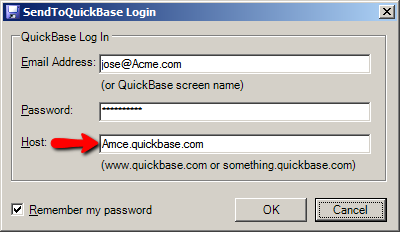
On the SendToQuickBase Login dialog in Outlook, you must enter your Account URL (i.e. YourCompanyName.quickbase.com, for example Acme.quickbase.com) instead of www.quickbase.com.
Instructions
- Restart Outlook. (If you do not restart Outlook, the SendToQuickBase login dialog will not display in step three below.)
- On the SendToQuickBase toolbar, click the Options button to show the Login dialog.

- On the SendToQuickBase Login dialog, change the "Host" URL from www.quickbase.com to YourCompanyName.quickbase.com where
YourCompanyName is the URL you use to visit the New Quick Base website, for example Acme.quickbase.com. Click OK, then on the Options dialog that appears, click OK to close it.
When Using Email Program other than Outlook
(When using the Cloud Bcc feature)Your SendToQuickBase Administrator must change the "Quick Base Host" setting on your SendToQuickBase License to your Account URL (i.e. YourCompanyName.quickbase.com, for example Acme.quickbase.com) instead of www.quickbase.com.
Instructions
- As the SendToQuickBase Administrator, in your web browser on the "My Apps" tab in Quick Base, click the "Adv. Search" link to locate the Quick Base Application named "SoftTechExperts Product Licenses". Be sure to check the box "Include all public applications in search". Once located, click the name to open the App.
- On the dashboard of the "SoftTechExperts Product Licenses" App just opened, click the pencil icon to edit your License record.
- Scroll down and change the "Quick Base Host" to your Quick Base Account URL, for example Acme.quickbase.com.

- Click the "Save" button to save the record.